18 Creating models
Summary
Models come from both base R and other packages.
- lm Creates a linear model.
The package modelr contains functions for evaluating models.
- add_predictions Calculates the predictions from the predictor variable values for a given model.
This chapter will use several functions and datasets from the modelr library.
18.1 The lm model in base R
Consider the dataset sim1 built into modelr.
## # A tibble: 30 × 2
##        x     y
##    <int> <dbl>
##  1     1  4.20
##  2     1  7.51
##  3     1  2.13
##  4     2  8.99
##  5     2 10.2
##  6     2 11.3
##  7     3  7.36
##  8     3 10.5
##  9     3 10.5
## 10     4 12.4
## # ℹ 20 more rows
The linear model that uses \(x\) to predict \(y\) is \(y = c_0 + c_1 x + \epsilon\). This model can be built in a more compact way using the lm function that is built into R. The function lm takes as its first input a formula form of the model. In this formula, the variable being predicted comes first, followed by a ~ symbol, followed by the predictor variables on the right.
For the simple model where x predicts y, the formula is then y ~ x. The second input to the model is the data itself. Therefore, to create the linear model, use
##
## Call:
## lm(formula = y ~ x, data = sim1)
##
## Coefficients:
## (Intercept)            x
##       4.221        2.052
The output displayed is the call to the model, together with the coefficients for the least squares estimates for the \(y\) intercept and the slope associated with \(x\). The fitted model actually contains much more information. This information can be stored using a variable assignment.
It is actually pretty rare to have just one predictor variable. If the model includes \(n\) different predictor variables, the linear model can be expanded to \[ y = c_0 + c_1 x_1 + \cdots + c_n x_n + \epsilon. \]
Consider sim4, which holds variables x1, x2, rep, and y.
## # A tibble: 300 × 4
##       x1     x2   rep       y
##    <dbl>  <dbl> <int>   <dbl>
##  1    -1 -1         1  4.25
##  2    -1 -1         2  1.21
##  3    -1 -1         3  0.353
##  4    -1 -0.778     1 -0.0467
##  5    -1 -0.778     2  4.64
##  6    -1 -0.778     3  1.38
##  7    -1 -0.556     1  0.975
##  8    -1 -0.556     2  2.50
##  9    -1 -0.556     3  2.70
## 10    -1 -0.333     1  0.558
## # ℹ 290 more rows
If x1 and x2 are used to predict y, then the model becomes as follows.
A look at the model reveals the fitted coefficients.
##
## Call:
## lm(formula = y ~ x1 + x2, data = sim4)
##
## Coefficients:
## (Intercept)           x1           x2
##     0.03546      1.82167     -2.78252
Note that there is still an intercept, but now there is a coefficient (a slope) for each of x1 and x2. From this fit, the best prediction for \(y\) given \(x_1 = 2\) and \(x_2 = 3\) would be
\[
\hat y = 0.03546 + 1.82167(2) - 2.78252(3).
\]
18.2 Functions of the modelr package
In the work above, the linear model was implemented directly in R. Unfortunately, that does not always translate well to other models. The idea of the modelr package is to create a set of functions that work with a wide variety of models.
Recall that by using the lm function, a linear model was created. Then functions in modelr can be called to make predictions using that model and to find the errors associated with the model using the actual data. The important thing is that these functions work with a wide variety of models. That is, if instead of using lm, another type of model had been used, the same functions could still be called to get predictions and errors. This gives the user great flexibility in modeling the data.
In the last chapter, the predictions and residuals for a model were calculated directly. Here the add_predictions and add_residuals functions will be used to calculate these values for any model.
18.3 The add_predictions function
Given a particular model, the add_predictions function is a fast way of finding what the predicted value of a variable is given the values of the predictor variable used in the model.
For instance, recall that the sim1 data can be modeled using a linear model using the lm function. The resulting model was stored in the variable sim1_mod. Let’s take a look at this model.
##
## Call:
## lm(formula = y ~ x, data = sim1)
##
## Coefficients:
## (Intercept)            x
##       4.221        2.052
The main information that it shows is the function call used to create the model, and the coefficients of the best fit least squares line.
From this, it is possible to write a function that creates a prediction for y given x. However, the nice thing about using the add_predictions function instead is that it works more many different types of models. It saves the user from having to write prediction functions on their own.
The first parameter to add_predictions is a tibble/data frame that holds the values of x, and then the second is the model itself.
## # A tibble: 3 × 2
##       x  pred
##   <dbl> <dbl>
## 1   2.5  9.35
## 2   5.1 14.7
## 3   9.6 23.9
The values are stored in the variable pred. Plotting these predictions with the original data shows how these predictions look. Here the parameter data in the geom_point functions will be used to plot data from sim1 and from the predictions made above.
g <- ggplot() +
  geom_point(data = sim1, aes(x, y)) +
  geom_point(data = first_pred, aes(x, pred), color = "red", size = 3)
g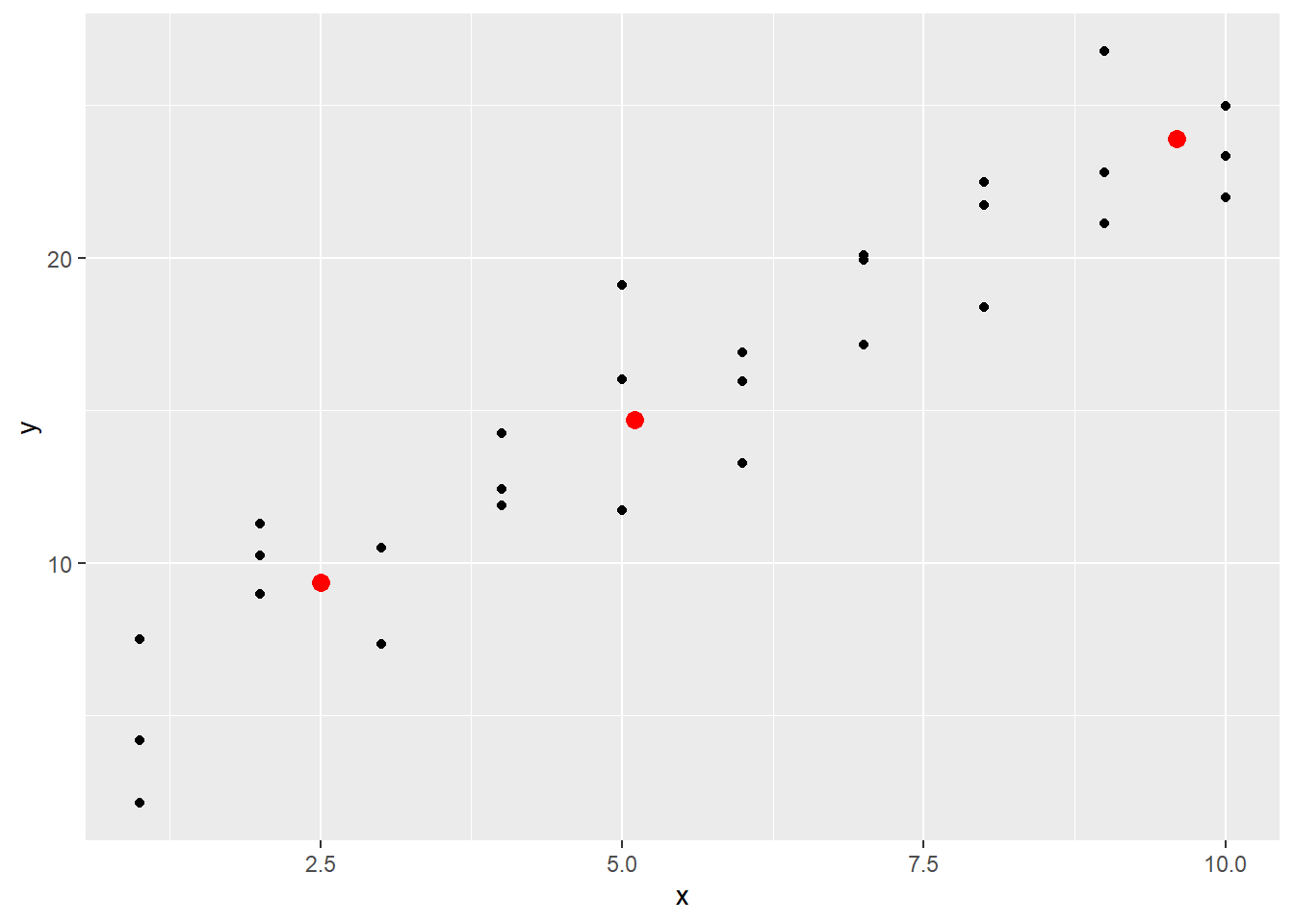
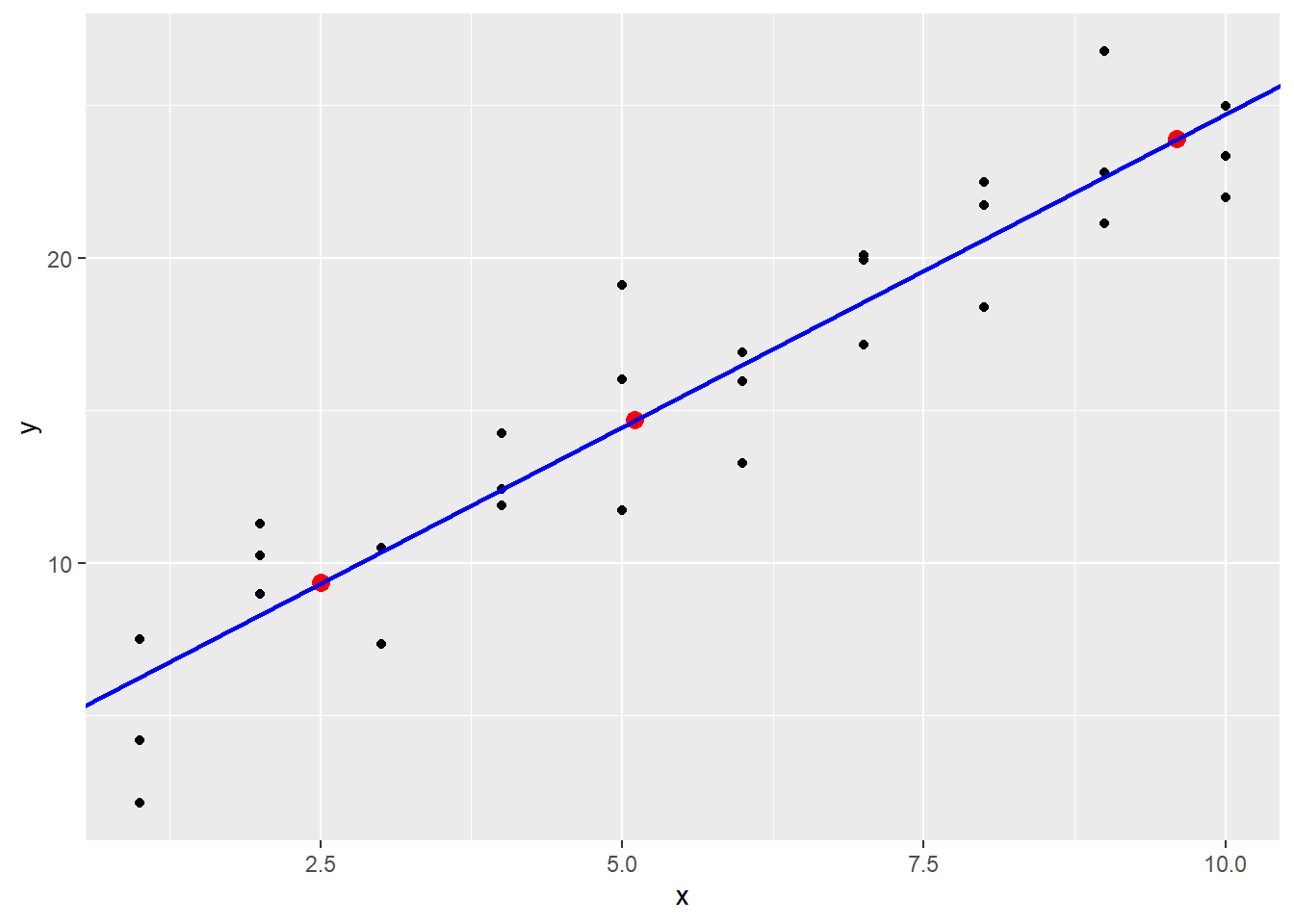
These lie on a line, and by using geom_abline it becomes clear that these predictions are coming from the linear model stored in sim1_mod when the coefficients are added manually.
18.4 Models with more than one predictor variable
Earlier the data in sim4 was considered.
| x1 | x2 | rep | y |
|---|---|---|---|
| -1 | -1.0000000 | 1 | 4.2476777 |
| -1 | -1.0000000 | 2 | 1.2059970 |
| -1 | -1.0000000 | 3 | 0.3534777 |
| -1 | -0.7777778 | 1 | -0.0466581 |
| -1 | -0.7777778 | 2 | 4.6386899 |
| -1 | -0.7777778 | 3 | 1.3770954 |
The model sim4_mod was constructed with both x1 and x2 as predictor variables.
##
## Call:
## lm(formula = y ~ x1 + x2, data = sim4)
##
## Coefficients:
## (Intercept)           x1           x2
##     0.03546      1.82167     -2.78252
The add_predictions function handles this new model easily.
| x1 | x2 | rep | y | pred |
|---|---|---|---|---|
| -1 | -1.0000000 | 1 | 4.2476777 | 0.9963094 |
| -1 | -1.0000000 | 2 | 1.2059970 | 0.9963094 |
| -1 | -1.0000000 | 3 | 0.3534777 | 0.9963094 |
| -1 | -0.7777778 | 1 | -0.0466581 | 0.3779726 |
| -1 | -0.7777778 | 2 | 4.6386899 | 0.3779726 |
| -1 | -0.7777778 | 3 | 1.3770954 | 0.3779726 |
18.4.1 Handling relationships between predictor variables
In the previous example, the predictor variables x1 and x2 were independently measured. However, it is possible for one predictor variable to be a function of another. For instance, \(x\) and \(x^2\) might be predictors for \(y\). For technical reasons, to put a mathematical expression like x^2 into a formula in R the Asis function, called using I(), is used.
To see this in action, first generate some data from the model
\[
y = 0.5 - 2 x + 0.2 x^2 + \epsilon.
\]
The original predictor variable was x. The mutate function can be used to add the mean of y to some randomly generated \(\epsilon\) error values created using the rnorm function to get data values.
set.seed(123456) # makes the random numbers come out the same way each time
x_values <- 1:10
sim5 <- tibble(x = c(x_values, x_values)) |>
  mutate(y = 0.5 - 2 * x + 0.2 * x^2 + 1.1 * rnorm(n()))

sim5 |>
  ggplot() +
    geom_point(aes(x, y))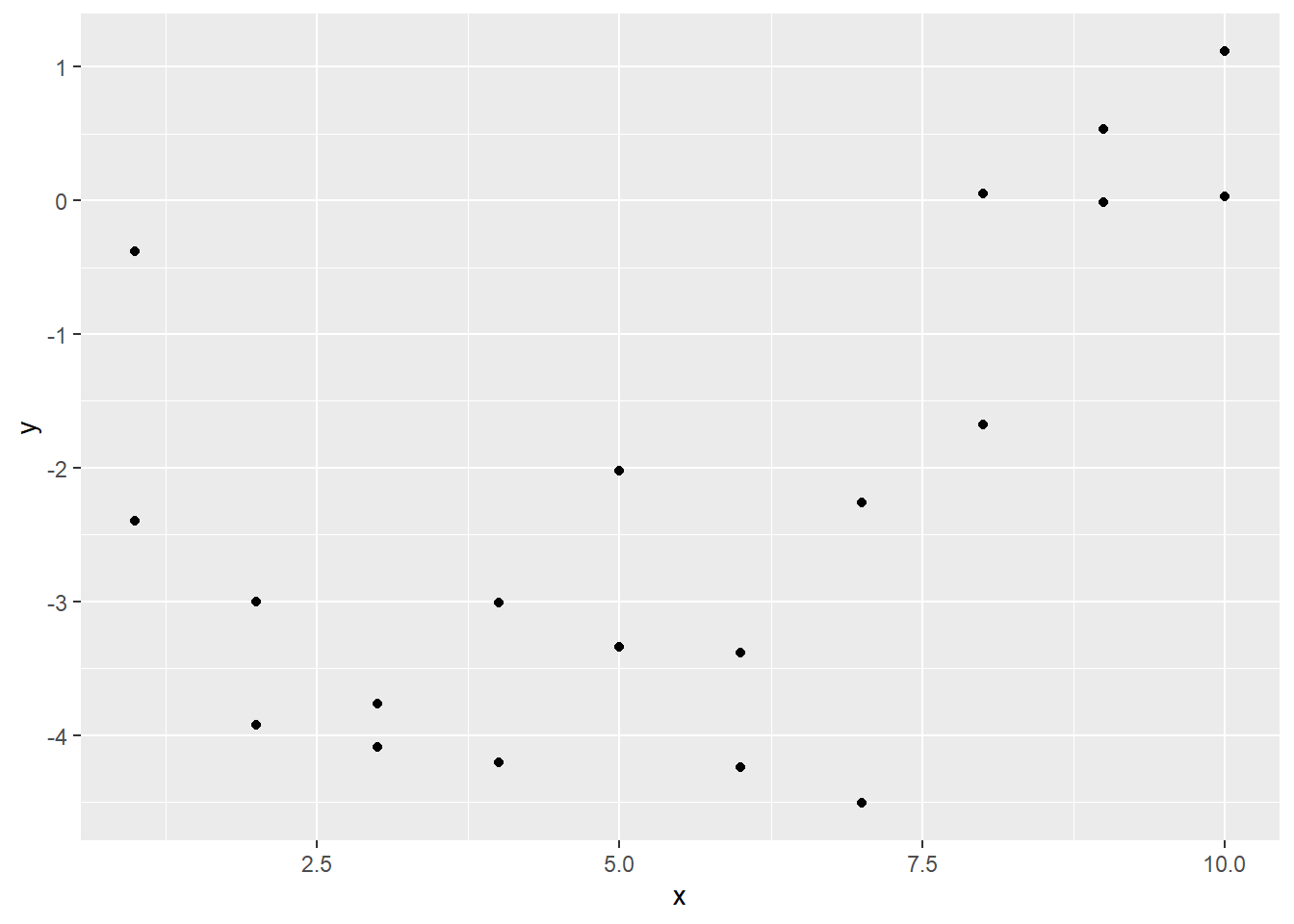
Now use lm to fit this model to the data. In this code, I(x^2) is used to indicate that the formula should treat the square of the x values as a single term.
## (Intercept)           x      I(x^2)
##  -0.8217856  -1.3251656   0.1528941
In this model, both x and I(x^2) are predictors, since they are both multiplied by coefficients and added together. So each gets its own coefficient. Now predictions can be made.
## # A tibble: 20 × 3
##        x       y   pred
##    <int>   <dbl>  <dbl>
##  1     1 -0.383  -1.99
##  2     2 -3.00   -2.86
##  3     3 -4.09   -3.42
##  4     4 -4.20   -3.68
##  5     5 -2.02   -3.63
##  6     6 -3.38   -3.27
##  7     7 -2.26   -2.61
##  8     8  0.0529 -1.64
##  9     9 -0.0149 -0.364
## 10    10  0.0312  1.22
## 11     1 -2.40   -1.99
## 12     2 -3.93   -2.86
## 13     3 -3.76   -3.42
## 14     4 -3.01   -3.68
## 15     5 -3.34   -3.63
## 16     6 -4.24   -3.27
## 17     7 -4.51   -2.61
## 18     8 -1.68   -1.64
## 19     9  0.535  -0.364
## 20    10  1.12    1.22
Now plot the original data together with the predictions.
ggplot(sim5, aes(x)) +
  geom_point(aes(y = y)) +
  geom_line(data = grid5_pred,
            aes(x = x, y = pred),
            color = "red", linewidth = 1)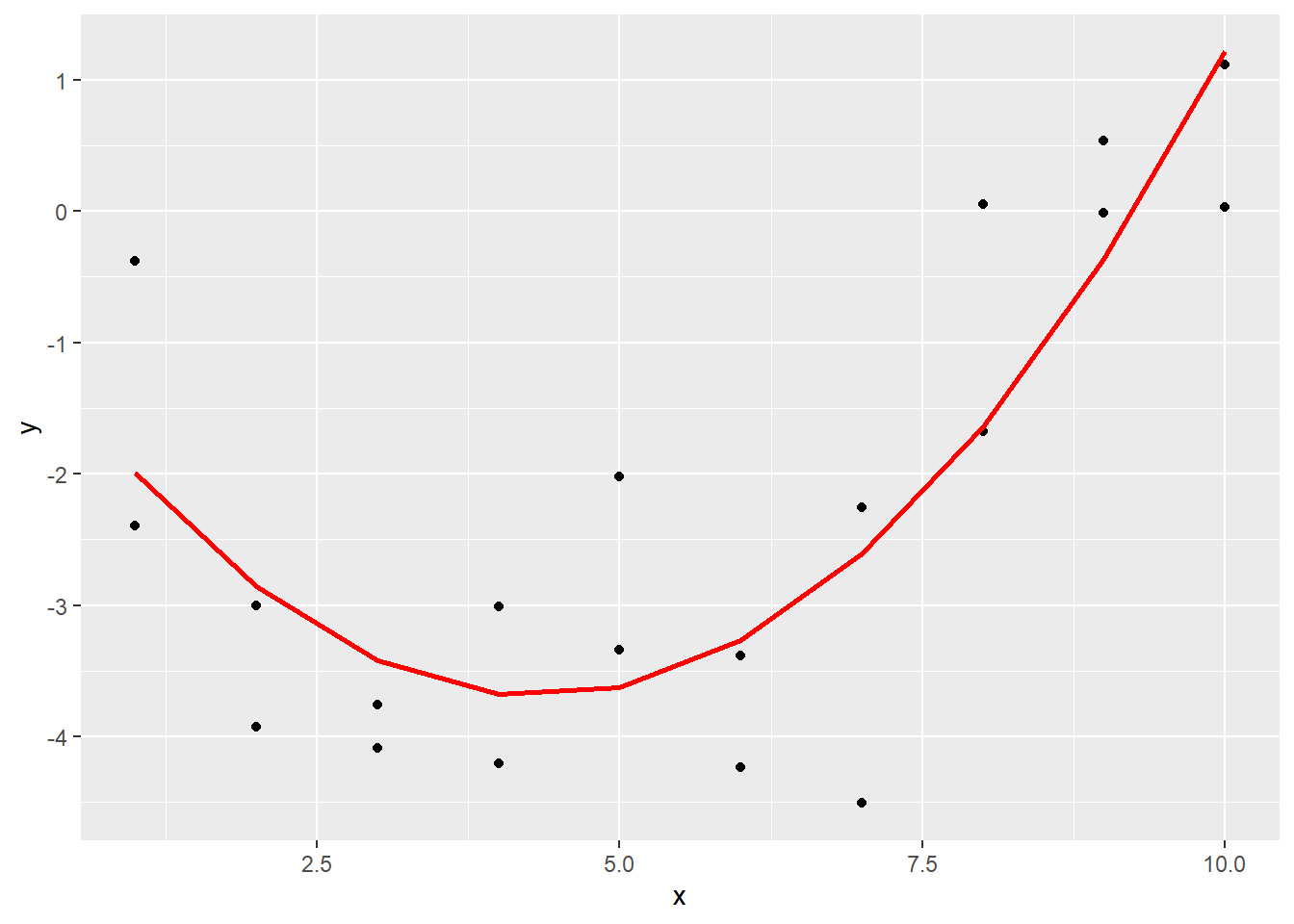
Note that this is still a linear model, even though the prediction line is a quadratic function. The term linear in linear model refers to the fact that the prediction is linear in x and x^2, that is, the model has the form \(y = c_0 + c_1 x + c_2 x^2\). Other functions of \(x\) like \(\exp(x)\) and \(\sin(x)\) could have also been part of the prediction! So linear models include an incredibly wide range of models, which is why they are so useful.