20 Case study: Titanic survival
Summary
The observations of a dataset are often divided into two disjoint sets.
The training set is used to build the model and fit parameters.
The test set is used to evaluate the model performance.
As a way to illustrate the techniques of data science, consider the problem of modeling and predicting survival on the Titanic using information about a given passenger. The website Kaggle provided the data, and challenged data scientists to build a useful model.
A good model is useful in predicting the value of a response variable given the value of the predictor variables. In order to test a particular model for data, a common approach is to break the data into two disjoint pieces, the training set and the test set.
Given a dataset, the training set is the subset of data that is used to fit a model.
Given a dataset, the test set is the subset of the data used to determine how good the model is at predicting observations that were not used to fit the model.
To see these ideas in action, consider the problem of identifying which passengers survived the sinking of the Titanic. For those unfamiliar with the history, in 1912, the passenger ship Titanic was launched on its maiden voyage from Southampton to New York City. The ship contained many novel safety features intended to keep the ship afloat should a disaster occur. It could stay afloat even with several compartments open to the ocean.
Unfortunately, while crossing the North Atlantic, the Titanic struck an iceberg that forced open multiple compartments and sank the ship. The vessel was only carrying lifeboats for a bit over half of the passengers on board. Many of those lifeboats left the ship half full. All in all, more than 1500 of the (estimated) 2224 passengers and crew died.
Kaggle, a website run by Google, holds data science competitions, together with datasets and resources for those learning data science. One such competition asked if users could predict which persons survived the Titanic based on information about the person such as their gender or the class of their ticket. In this case, the person submitting the problem already divided the observations into a training set and test set.
With these downloaded into a subdirectory named datasets, the following reads this data.
train_titanic <- read_csv("datasets/train_titanic.csv")
test_titanic  <- read_csv("datasets/test_titanic_complete.csv")
Here the Survived variable is the response that is being predicted. The training data has this information.
## # A tibble: 6 × 12
##   PassengerId Survived Pclass Name     Sex     Age SibSp Parch
##         <dbl>    <dbl>  <dbl> <chr>    <chr> <dbl> <dbl> <dbl>
## 1           1        0      3 Braund,… male     22     1     0
## 2           2        1      1 Cumings… fema…    38     1     0
## 3           3        1      3 Heikkin… fema…    26     0     0
## 4           4        1      1 Futrell… fema…    35     1     0
## 5           5        0      3 Allen, … male     35     0     0
## 6           6        0      3 Moran, … male     NA     0     0
## # ℹ 4 more variables: Ticket <chr>, Fare <dbl>, Cabin <chr>,
## #   Embarked <chr>
A variable like Survived that takes on value 1 when an event occurs and 0 when it does not is called an indicator variable.
The test data is similar.
## # A tibble: 6 × 12
##   PassengerId Survived Pclass Name     Sex     Age SibSp Parch
##         <dbl>    <dbl>  <dbl> <chr>    <chr> <dbl> <dbl> <dbl>
## 1         892        0      3 Kelly, … male   34.5     0     0
## 2         893        1      3 Wilkes,… fema…  47       1     0
## 3         894        0      2 Myles, … male   62       0     0
## 4         895        0      3 Wirz, M… male   27       0     0
## 5         896        1      3 Hirvone… fema…  22       1     1
## 6         897        1      3 Svensso… male   14       0     0
## # ℹ 4 more variables: Ticket <chr>, Fare <dbl>, Cabin <chr>,
## #   Embarked <chr>
The model is fitted using the training data, and then tested using the test data.
The first thing usually done in statistical modeling is exploratory data analysis. This is used to get an idea of how the data behaves. For instance, in this data set, how many of the passengers survived on average? The nice thing about indicator functions is that the sample average automatically provides an estimate of the probability that the indicator function is 1. That is, the sample average is an estimate of the survival rate.
## # A tibble: 1 × 1
##   sur_rate
##      <dbl>
## 1    0.384
So only about 38.3% of passengers survived. This implies that the simple prediction that everyone died regardless of the other variables will be right about 61.6% of the time. This simple model can be created with a mutate function.
Take a look to see that this code worked.
## # A tibble: 6 × 3
##   PassengerId Survived  pred
##         <dbl>    <dbl> <dbl>
## 1         892        0     0
## 2         893        1     0
## 3         894        0     0
## 4         895        0     0
## 5         896        1     0
## 6         897        1     0
So how well does the model do? This is just the percentage of time that the prediction matches the data, called the predictive accuracy. Recall that mean can be used to find this percentage. This must be used within a summarize function to output the result.
## # A tibble: 1 × 1
##   pred_accuracy
##           <dbl>
## 1         0.622
So this simple model was right about 62.2% of the time on the test data. Note that this was actually slightly higher than the 61.6% value for the training data. Because they are different observations, the model will have different predictive accuracy for the training and test datasets.
Call this simple model the baseline prediction because none of the actual observation values for each passenger are being used in the prediction. Any model created should at least meet this baseline level and will only be useful if it is more accurate.
Those familiar with history might recall the maxim: “Women and children first” when a ship was sunk. Therefore, it is reasonable to assume that there might be a difference in who survived based on the variable Sex. First use group_by to tackle this.
## # A tibble: 2 × 2
##   Sex    sur_rate
##   <chr>     <dbl>
## 1 female    0.742
## 2 male      0.189
Wow, that is a stark difference! Roughly 74.2% of female passengers survived, while only 18.8% of male ones did. This indicates that a better model predicts surival for female passengers and nonsurvival for male passengers.
gender_solution <-
  test_titanic |>
  mutate(pred = ifelse(Sex == "female", 1, 0)) |>
  select(PassengerId, Survived, pred)
gender_solution |> head() |> kable() |> kable_styling()| PassengerId | Survived | pred |
|---|---|---|
| 892 | 0 | 0 |
| 893 | 1 | 1 |
| 894 | 0 | 0 |
| 895 | 0 | 0 |
| 896 | 1 | 1 |
| 897 | 1 | 0 |
Is this model better? Take a look at the predictive accuracy.
## # A tibble: 1 × 1
##   pred_accuracy
##           <dbl>
## 1         0.766
With this simple model that just looks at one variable, predictive accuracy has jumped from 62.2% up to 76.5%.
20.0.1 What’s in a name?
Now consider the names of the passengers.
## # A tibble: 6 × 12
##   PassengerId Survived Pclass Name     Sex     Age SibSp Parch
##         <dbl>    <dbl>  <dbl> <chr>    <chr> <dbl> <dbl> <dbl>
## 1           1        0      3 Braund,… male     22     1     0
## 2           2        1      1 Cumings… fema…    38     1     0
## 3           3        1      3 Heikkin… fema…    26     0     0
## 4           4        1      1 Futrell… fema…    35     1     0
## 5           5        0      3 Allen, … male     35     0     0
## 6           6        0      3 Moran, … male     NA     0     0
## # ℹ 4 more variables: Ticket <chr>, Fare <dbl>, Cabin <chr>,
## #   Embarked <chr>
The format seems to be for male passengers: last name (surname), followed by a title (if they have one), followed by the first and middle name (if they have one). For women it is similar, but after a title such as Mrs. the name of the husband is given, followed by the woman’s name in parentheses afterwards.
There is a lot of information there, but begin by pulling out the title of the passenger. To do this, first skip until the first comma followed by a space, then the information desired comes before the next period. This can be done as follows.
titles <-
  train_titanic |>
  mutate(Title = str_replace(Name, "[^,]+, ([^\\.]+).+", "\\1")) |>
  select(Survived, Title)
titles |> head()
## # A tibble: 6 × 2
## Survived Title
## <dbl> <chr>
## 1 0 Mr
## 2 1 Mrs
## 3 1 Miss
## 4 1 Mrs
## 5 0 Mr
## 6 0 MrTo see all the titles, count how many times each appears. The n function does just that, counting the number of rows. If this is applied after group_by, it counts the number of times each unique value appears.
## # A tibble: 17 × 2
##    Title        count
##    <chr>        <int>
##  1 Mr             517
##  2 Miss           182
##  3 Mrs            125
##  4 Master          40
##  5 Dr               7
##  6 Rev              6
##  7 Col              2
##  8 Major            2
##  9 Mlle             2
## 10 Capt             1
## 11 Don              1
## 12 Jonkheer         1
## 13 Lady             1
## 14 Mme              1
## 15 Ms               1
## 16 Sir              1
## 17 the Countess     1
The result is 17 different titles. Several just indicate gender, but others like Rev indicate profession, and some like Lady represent aristocratic status. Consider collapsing these down by type of title.
titles2 <-
  titles |>
  mutate(Title = factor(Title)) |>
  mutate(Title =
    fct_collapse(Title,
      "Miss" = c("Mlle", "Ms"),
      "Mrs" = "Mme",
      "Ranked" = c( "Major", "Dr", "Capt", "Col", "Rev"),
      "Noble" = c("Lady", "the Countess", "Don", "Sir",
                    "Jonkheer")
    )
  )
Now the mean survival rate by title type can be computed.
## # A tibble: 6 × 2
##   Title  title_survival
##   <fct>           <dbl>
## 1 Ranked          0.278
## 2 Noble           0.6
## 3 Master          0.575
## 4 Miss            0.703
## 5 Mrs             0.794
## 6 Mr              0.157
Again, a sharp difference, with Ranked and Mr titles falling short of the overall survival rate, while Noble and Master were higher than a flip of the coin. The results for Miss and Mrs are unsurprising, given that these passengers are also all female.
20.1 Missing Data
Most datasets of any reasonable size will contain missing data, and this one is no exception. It would be helpful to be able to count the number of NA entries in each column of the data. This could be done with summarize, but an argument would be necessary for every single column.
A better way is to use the map_dbl function to find these values. This function requires a dataset as the first parameter, and a function to apply to every column as the second. Here the sum of is.na is used to count the number of NA entries. The function to be applied, ~sum(is.na(.)) is not given a separate name, so it is known as an anonymous function. (This is also called a lambda function.) In the purrr package, anonymous functions begin with ~. The period . inside of is.na(.) acts as a placeholder, showing where the column being analyzed is sent as an input argument to the function.
## PassengerId    Survived      Pclass        Name         Sex         Age
##           0           0           0           0           0         177
##       SibSp       Parch      Ticket        Fare       Cabin    Embarked
##           0           0           0           0         687           2
So every passenger has an ID, but not all have an Age, and quite a few do not have a Cabin number. That should not be too much of a problem as long as there is no attempt to build a model based on the Cabin variable.
20.2 Ticket class
Speaking of ticket class, how do these survival rates vary among first, second, and third class passengers? The following puts this in graph form, with a dotted line at the overall survival rate for comparison.
train_titanic |>
  ggplot(aes(x = Pclass, fill = factor(Survived))) +
    geom_bar(position = "fill") +
    theme_minimal() +
    ylab("Survival Rate") +
    labs(fill = "Survived") +
    geom_hline(yintercept = 0.3838, col = "blue",
               linetype = "dotted") +
    ggtitle("Survival Rates by Passenger Class")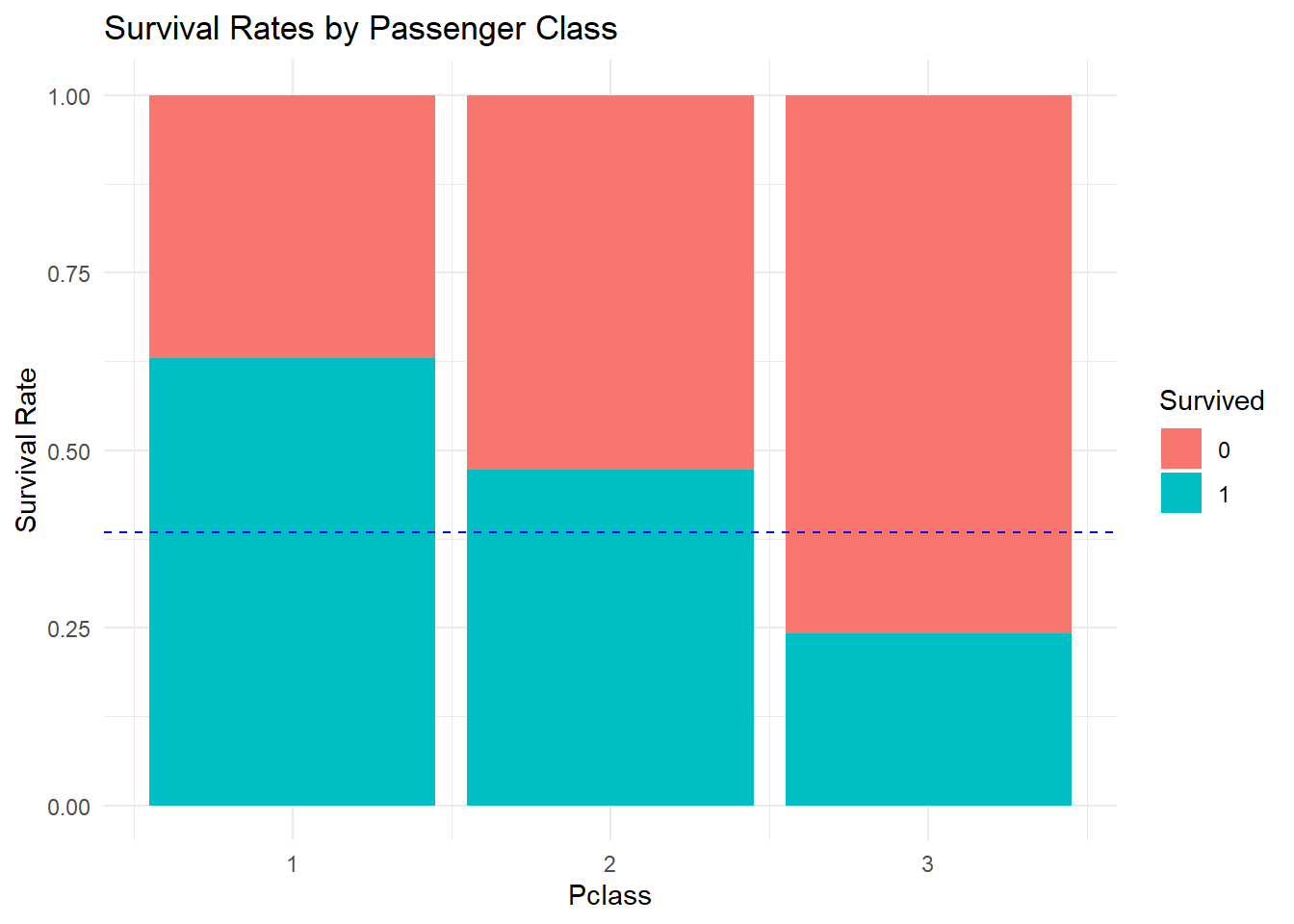
From the graph, being in first class seems to be associated with survival. Second class also survives at a higher than baseline rate, but third class does not.
20.3 Fare
The class of the passenger is a discrete variable. How does this compare to information about the actual fare that the passenger paid for their ticket? Even among first class passengers, there are differences in the prices of tickets. A density plot can be used with numerical values to visualize such differences.
train_titanic |>
  ggplot(aes(x = Fare, fill = factor(Survived))) +
    geom_density(alpha = 0.4) +
    ggtitle("Density Plot of Fare related to Survival")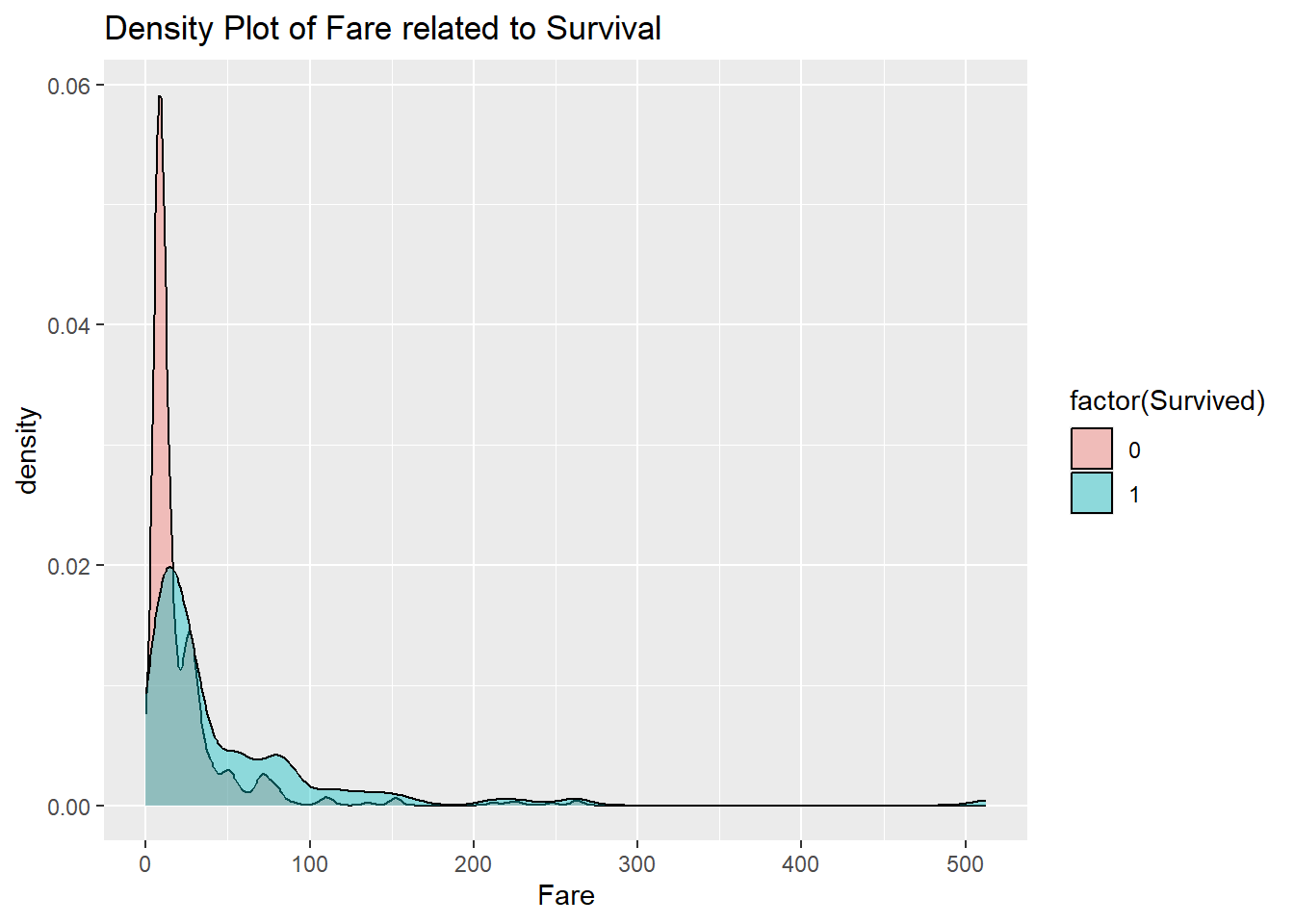
The fares go way out to the right in this dataset. This type of behavior is often seen in heavy-tailed data. The price of a first class ticket can be an order of magnitude higher than that of a typical third class ticket. This type of behavior is in contrast to light-tailed data such as that coming from the normal distribution.
One thing that can lead to heavy-tailed data is when the thing being measured tends to grow by multiplication rather than addition. For instance, a price might increase by 1% or 2% or 3%. That is equivalent to multiplying by either 1.01, 1.02, or 1.03. This type of data occurs often in economics and finance.
Consider taking the natural logarithm of the data. Taking the log turns multiplication into addition, and therefore turns data that came from multiplicative factors into additive factors. This does not always work, but often will make the resulting dataset light-tailed. Unfortunately, there are some 0 fares in the data, and the natural logarithm of 0 is minus infinity. To deal with this problem, simply add 1 to all the fares before taking the log. The function log1p does this in a numerically stable way.
train_titanic |>
  ggplot(aes(x = log1p(Fare), fill = factor(Survived))) +
    geom_density(alpha = 0.4) +
    ggtitle("Density Plot of Fare related to Survival")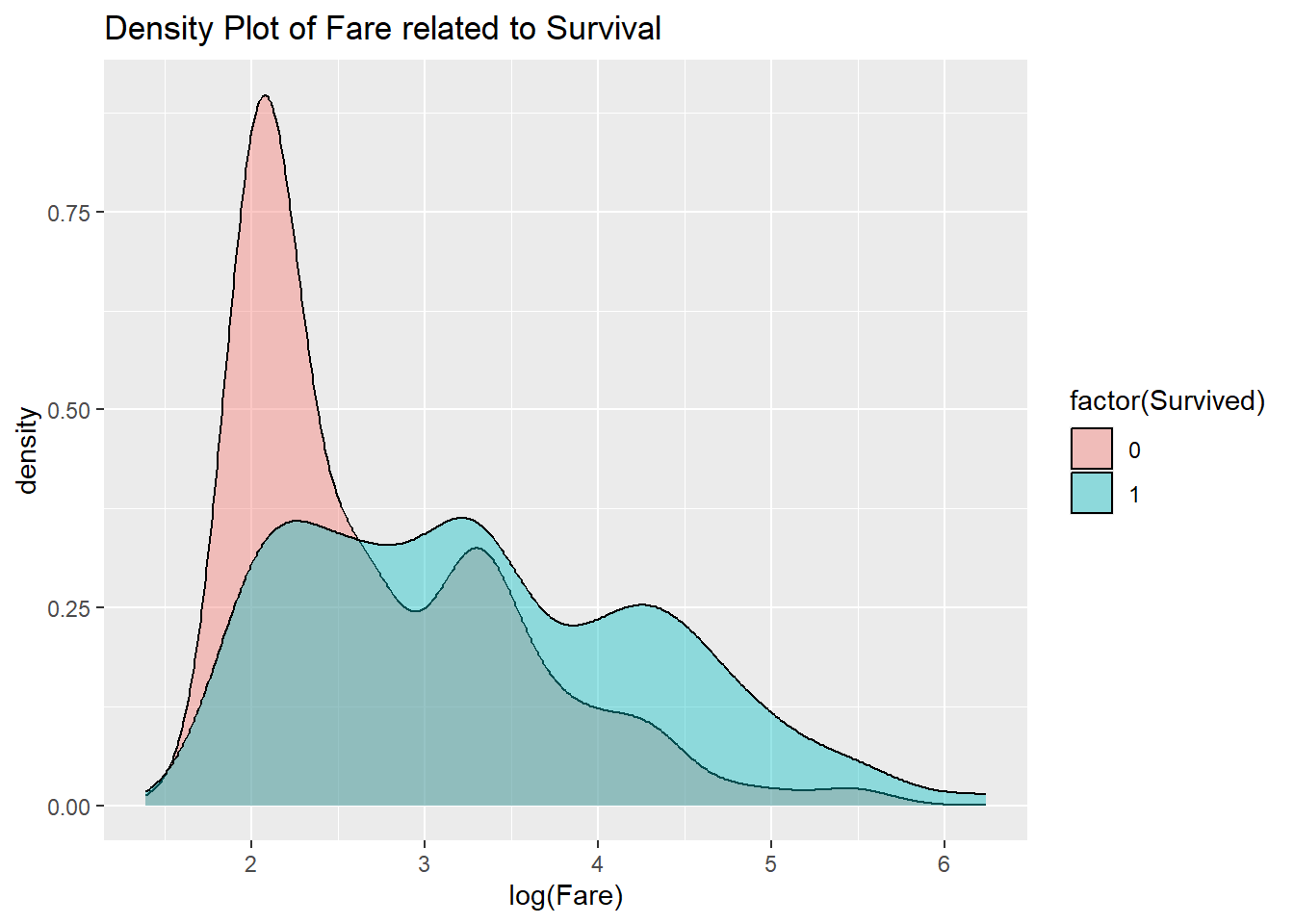
From the graph, higher fares seem associated with higher survival rates.
20.4 Age
A similar plot could be made for the age variable. Because the largest Age value for humans is bounded, there is no way that the data can be heavy-tailed, so the log is not needed.
train_titanic |>
  ggplot(aes(x = Age, fill = factor(Survived))) +
    geom_density(alpha = 0.4) +
    ggtitle("Density Plot of Survival versus Age")
## Warning: Removed 177 rows containing non-finite outside the scale range
## (`stat_density()`).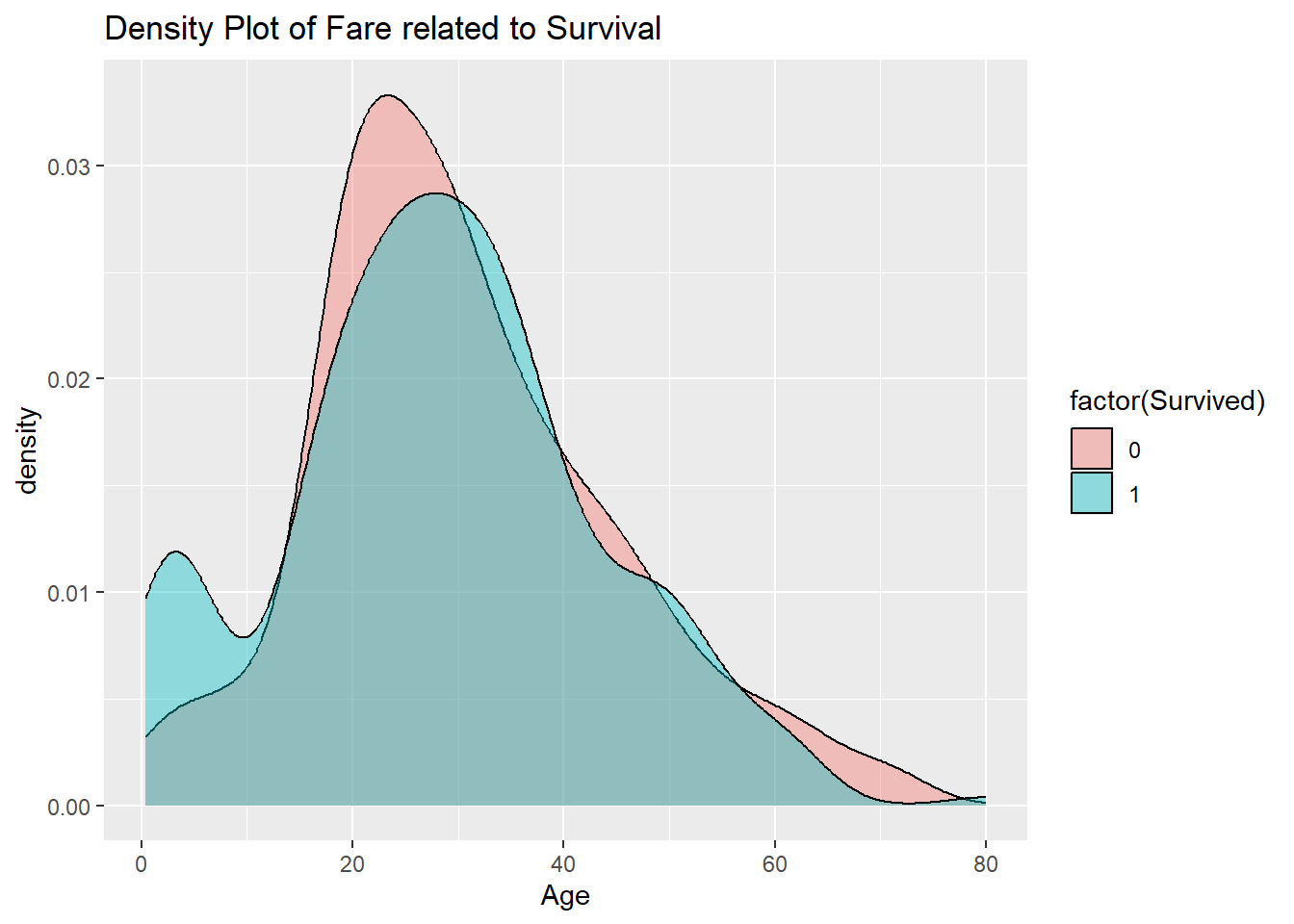
20.5 Building a model
Now that the EDA has shown what variables might be of interest in prediction, it is time to start building models. The possible predictors include both categorical and numerical data. For this type of mixed data, a conditional inference tree is often useful. This type of tree works by branching, essentially breaking the predictor variable space into two pieces, and recursively working on each piece to find breaking points that aid in predicting the response.
For this problem, a branch might be on passenger class, or gender. The tree uses nonparametric statistical tests in order to decide which factor to split the space on next. Often, multiple such trees are created for a single dataset, giving a conditional inference forest. The cforest function from the partykit can be used to build such a forest.
This function makes some random choices in how the tree is constructed. That means that every time you call it, it can generate a different tree for prediction. Computers use a complicated function to produce random numbers. By setting the seed of this function, the same numbers will be produced each time. The set.seed function can be used to set the seed for this model.
Now for the construction of the forest. The first argument to cforest is the statistical model (the response, a ~, and the predictors separated by + signs), and the second is the dataset. Because the dataset does not come first, to pipe the data use the _ operator.
Here the argument data = _ indicates that the pipe is sending the result to the data value rather than the default of the first parameter.
Unlike most of the functions used so far, cforest can take a long time to run. But once built, the model is quick to execute.
Use the functions from the modelr to test it.
Take a look at how the predictions compare to the original data. Recall that add_predictions by default puts the predictions in a variable called pred.
## # A tibble: 418 × 2
##    Survived   pred
##       <dbl>  <dbl>
##  1        0 0.392
##  2        1 0.0294
##  3        0 0.221
##  4        0 0.114
##  5        1 0.726
##  6        1 0.121
##  7        0 0.202
##  8        1 0.226
##  9        1 0.259
## 10        0 0.103
## # ℹ 408 more rows
Note that the prediction is not strictly a 0 or 1, but instead is a fraction that is at least 0 and at most 1. However, the goal is to get 0 or 1 answers. One way to do this is to use thresholding. In this method, a fixed number such as \(0.5\) is chosen. Predictions at or above this level get rounded to 1, and below the threshold are rounded down to 0.
Another way to handle this is set up Survived as a factor in R before doing the conditional inference forest. The functions mutate and factor can be used to accomplish this.
Now build predictions for this model.
Now pull out the Survived and pred variables.
## # A tibble: 891 × 2
##    Survived pred
##       <dbl> <fct>
##  1        0 0
##  2        1 0
##  3        1 0
##  4        1 1
##  5        0 0
##  6        0 0
##  7        0 0
##  8        0 0
##  9        1 1
## 10        1 1
## # ℹ 881 more rows
The first few rows look accurate, and it is easy to check all the training data.
## # A tibble: 1 × 1
##   `mean(Survived == pred)`
##                      <dbl>
## 1                    0.750
So that is interesting! Just by including the knowledge of the Fare, the model was able to predict correctly about 75.0% of the time on the training data. Now add a few more predictors.
Now to see what the predictive accuracy is like for the test data.
test_titanic |>
  mutate(sur_factor = factor(Survived)) |>
  add_predictions(cf_model3) |>
  summarize(pred_accuracy = mean(Survived == pred))
## # A tibble: 1 × 1
## pred_accuracy
## <dbl>
## 1 0.775It improved a little to about 77.8%. Is this worth it? It is a bit difficult to say. The model is more complex, which perhaps hides the strong relationship between gender and survival.
In the EDA, the title of the person seemed to be a helpful predictor. To see if that holds, a modified version of the dataset needs to be created.
train2 <-
  train_sur_factor |>
    mutate(Title = str_replace(Name, "[^,]+, ([^\\.]+).+", "\\1")) |>
    mutate(Title = factor(Title)) |>
    mutate(Title =
      fct_collapse(Title,
        "Miss" = c("Mlle", "Ms"),
        "Mrs" = "Mme",
        "Ranked" = c( "Major", "Dr", "Capt", "Col", "Rev"),
        "Noble" = c("Lady", "the Countess", "Don", "Sir","Jonkheer")
      )
)To find the predictive accuracy on the test data, it is necessary to also add this new feature, Title to this set. However, a wrinkle arises. In the training data, the title Dona does not appear, but in the test data it does.
test_titanic |>
  mutate(Title = str_replace(Name, "[^,]+, ([^\\.]+).+", "\\1")) |>
  mutate(Title = factor(Title)) |>
  select(Title) |>
  unique()
## # A tibble: 9 × 1
## Title
## <fct>
## 1 Mr
## 2 Mrs
## 3 Miss
## 4 Master
## 5 Ms
## 6 Col
## 7 Rev
## 8 Dr
## 9 DonaSince this is a Spanish title of nobility, be sure to add it to the fct_collapse. Because many titles appear in the training data that do not in the test data, R will give a warning about these.
test_title <-
  test_titanic |>
    mutate(sur_factor = factor(Survived)) |>
    mutate(Title = str_replace(Name, "[^,]+, ([^\\.]+).+", "\\1")) |>
    mutate(Title = factor(Title)) |>
    mutate(Title =
      fct_collapse(Title,
        "Miss" = c("Mlle", "Ms"),
        "Mrs" = "Mme",
        "Ranked" = c( "Major", "Dr", "Capt", "Col", "Rev"),
        "Noble" = c("Lady", "the Countess", "Don", "Dona", "Sir","Jonkheer")
      )
    )
## Warning: There was 1 warning in `mutate()`.
## ℹ In argument: `Title = fct_collapse(...)`.
## Caused by warning:
## ! Unknown levels in `f`: Mlle, Mme, Major, Capt, Lady, the Countess, Don, Sir, JonkheerNow to check the results.
## # A tibble: 1 × 1
##   pred_acc
##      <dbl>
## 1    0.763
It actually does slightly worse! Recall that the model is being fitted to the training data. Adding too many variables can cause the model to better predict the training data, but be worse when faced with new observations from outside the training set. So be careful not to just throw in every possible predictor variable into your model.
20.5.1 Testing versus Validation
Note that several models were tested against the same test data. From a statistical standpoint, this means that the predictive accuracy for the model estimated using the test set might itself not be close to the true value. In an ideal world, you would decide on the model first, and then run it against the test data set once only. When you run multiple models against a dataset, that dataset becomes a validation set. Then hopefully you would have a separate test set for the final model chosen. This is important if any statistical claims about the accuracy of the model are going to be made later.
20.6 Considerations
There are always two goals for models.
Accuracy. One goal is for the model to be good at prediction.
Simplicity. A temptation is to throw everything into a model in the hopes of doing as well as possible.
Keeping things simple means not using all available data as predictors. This in the end can actually help with the first goal. An overfitted model might end up less accurate on the test data than the original training data.
How can it be determined if the model is overfitted? It is not easy. There are statistical tests that can be used together with validation sets to try to understand when the model is overfitting.
Another thing to keep in mind: these models only give predictions through associations. For instance, gender value is strongly associated with survival, as is passenger class. For numerical data, this association is typically shown by estimating the correlation between the two values.
Typically these associations are not causal. That is, they do not say that the predictor variables cause the predicted value to be what it is. In the Titanic model, there are social reasons why someone with a first class ticket might be more likely to survive, but the data given cannot prove this connection.
This is one reason why it is so important when working with data from a domain (such as economics, medicine, or sociology) to have some knowledge of how the domain works in order to understand what mechanisms might be linking predictor variables to the response in our models.